














The Increasing amount of Freelance Workforce

Apr 11, 2018
The Increasing amount of Freelance Workforce


As shared by Antara News, The Asia Pacific region has a thriving freelance economy with Singapore leading the pack as the top market for freelance talent hire in Asia and one of the top 10 markets for independent workers globally. According to data released from a Southeast Asia freelancer jobs portal, India is at the forefront with 2,369,000 users and The Philippines as an upcoming market with 536,000 users. Other markets in the region are also active in the sphere with 412,000 users tracked in Indonesia; and 155,000 in Vietnam; across industries including Graphic Design, Internet Marketing and Programming.

Understanding the Freelance Essence

It is evident that the freelancer segment is now a flourishing community. In fact, according to a survey done by OECD’s Entrepreneurship at a Glance 2015 report, more than 50% of this workforce segment shared that work-life balance and ability to forge ahead their own paths are the main driving forces behind their decision to pursue flexible working.

However, up to this day, this workforce segment is still under-served, under attended and given cut-rates. Additionally, even while freelancers do enjoy way flexible time and work on their own terms, it doesn’t take away the fact that there are times when it can also get lonely especially when they do not have the support of the organization that they work for.

Spotting and Using the Trend to your Advantage

The very few businesses that hire and use freelancers’ services, whether on a long-term agreement or on an ad-hoc basis can be considered as pioneers as they are the ones who acknowledged the value behind freelance working, that is independence and entrepreneurial spirit. They are the ones that took and leapt at the chance. Companies who did this were reported to have enjoyed and still is enjoying its benefits on their own workforce, as shown by the survey done Deloitte in their Global Human Capital Trends report last year.

Business Opportunity & Network Opportunities that go along with it

With the increasing number of freelance workforce, businesses can take this as an opportunity. Having these freelance workers convinced about working in high-quality, flexible, and fully-equipped working spaces for just a fraction of the cost can be a win-win situation for both parties. The more freelance workers find it more convenient to work in flexible working spaces, the more business it would mean. This could also benefit the workforce to work more productively, knowing that their rental for the space is limited, and would then motivate them to focus more on their work. This could also open networking opportunities for both the workforce and service office providers.


How to Create Title Tags That Increase Your Click-through Rate

Nov 06, 2015
How to Create Title Tags That Increase Your Click-through Rate

First and foremost, we need to know  what exactly a Meta Title is and what is its impact to your website.

Title Tags or Meta Titles define the titles of your page within the Meta Tags. Title Tags are very important because these are used by search engine results pages (SERPs) and reinforce your branding. Search engines display preview snippets of your website pages. That’s why it is critical if you don’t know how to create powerful and effective Title Tags.

Almost all sites have this tag within the header section of the code

Sample Code:
<title>This Is Your Title – Services – Company Name</title>
search engine snippet
ARE YOU READY?

Okay let’s begin…

These are the 8 keys that every webmaster should keep in mind.

1.  Use only 1 <title> tag per page.
Some webmasters don’t have any idea that creating many <title> tags in a page may refute the potential value of their <title> tag. Why? Because search engines only need 1 <title tag> per page. The other <title> will be ignored by the search engines.

2. Place your best keywords in your <title> tag.
Did you know that the most valuable tag to search engines is your <title> tag?
That’s why you should add your most important keyword in the first part of your <title> tag, then add the second next most important keywords, and so on.

3. Always be aware of the length.
It is just a waste of time and effort if your title is too long for the standard characters and pixels that Google require. Why? Because search engines will just truncate titles that exceed their standard length. For Google, the standard length is usually between 50-65 characters, or 512 pixels wide. When the title exceeds the standard length, it will show an ellipsis “…” to indicate that your <title> tag has been cut off.

4. Keep your <title> relevant to your page.
Some webmasters are using or adding lines that are not totally related to the page but what they did is wrong. Always keep in mind that your <title> is the reflection of your page content. No matter how good your content is, if your title is not relevant, it will have a negative impact to your site.

5. Begin every keyword <title> with a capital letter because it’s easier to read and that is the proper format in creating a <title>.

6. Add emotion or excitement.
Dan Shure blogger of MOZ mentioned that “Your title should conjure the right emotion in viewers.”
Here are some words that express excitement:

  • killer
  • amazingly
  • fantastic
  • FREE
  • mistakes
  • mind-blowing
  • surprising
  • staggering
  • surprisingly
  • uncommonly
  • unusually
  • irresistibly
  • seductively
  • tempting
  • unexpected
  • unbelievably
  • astonishing
  • astoundingly
  • remarkably
  • insanely
  • viral
  • epic

Adding exclamation points and writing it all caps can also bring a big impact to your title because of its sense of urgency.

e.g. FREE 30-Day Trial for All Serviced Offices – LIMITED OFFER ONLY!

7.  Choose the right <title> separator.
Here are some separators that most of the webmasters are using.

Title Separator

8. Study your target keywords. For me, this is the most important part when creating a <title>.  You can have good keywords by studying your competitors’ target keywords. How?

First, make sure you have a Google Adwords account.
Log in to your Google Adwords account.
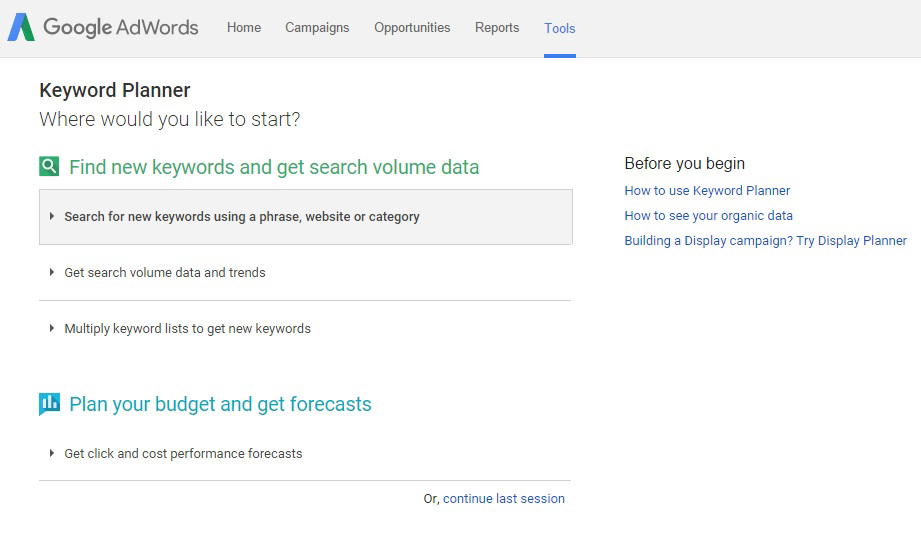
Once you are already logged in, go to tools>keyword planner.

Google Adwords Get New

On the Google Adwords sidebar, click find new keywords and get new search volume data.

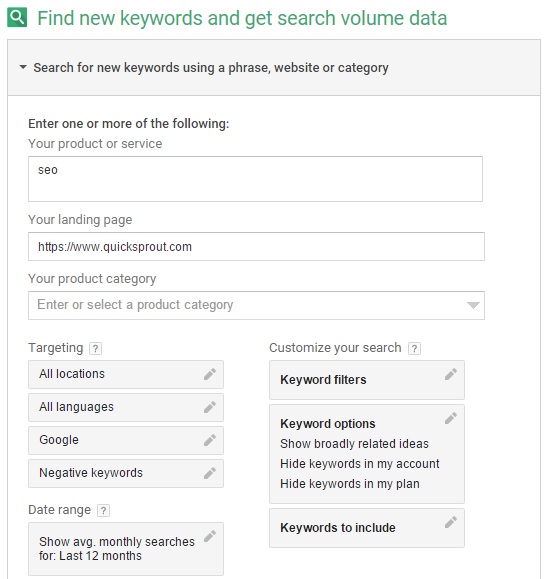
Google Adwords KP

Add your target product or service and your competitor URL.
Then click the GET IDEAS button.

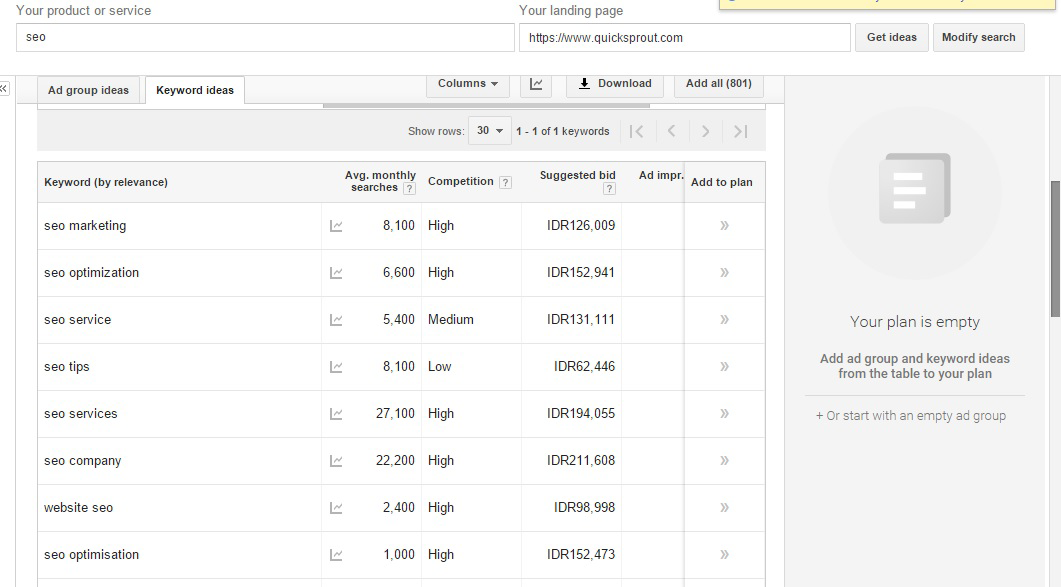
Google Adwords Result

BOOOOOOM…

You have now sets of good keywords.
You just need to filter it and pick the keywords that are not too competitive, but high in search traffic.

START NOW AND OUTRANK YOUR COMPETITORS!